Best Robot Kits for Kids to Learn Coding (2026 Buying Guide)
Six coding robot kits for kids compared by build complexity, coding pathway, and verified reviews to find the best options for ages 6 to 16.

In this article
- Who this guide is for
- Top picks at a glance
- How we chose these robot kits
- Robot kit comparison table
- ELEGOO UNO R3 Smart Robot Car Kit V4: Best Overall
- Makeblock mBot STEM Coding Robot: Best for Beginners
- Sillbird STEM Robot Building Kit: Best Budget
- Makeblock mBot Ranger 3-in-1: Best for Advanced Kids
- Apitor STEM Coding Robot Toy 6-in-1: Best Building Experience
- Thames & Kosmos My Robotic Pet: Coding Chameleon: Best for Youngest Kids
- Buying guide: what actually matters in a coding robot kit
- Final verdict
Who this guide is for
This guide is for parents and teachers picking the best robot kits for kids to learn coding without gambling on a toy that ends up in a drawer after one weekend. We compared six real, currently sold kits spanning ages 6 to 16, evaluating build complexity, whether the coding language is block-based (Scratch-style) or text-based (Arduino C++), battery/charging setup, and verified Amazon review volume as a proxy for real-world durability. If your child has never coded before, start with a block-based kit; if they already know basic Scratch, a hybrid Arduino kit gives more room to grow. Every pick below ships with an app or software companion so kids write real code, not just push a button.
Top picks at a glance
| Award | Product | Best for | |
|---|---|---|---|
| 🏆 Best Overall |  ELEGOO UNO R3 Smart Robot Car Kit V4 ELEGOO UNO R3 Smart Robot Car Kit V4 | Kids 12+ ready for real Arduino coding | Check Price on Amazon |
| 🥇 Best for Beginners |  Makeblock mBot STEM Coding Robot Makeblock mBot STEM Coding Robot | Kids 8-12 starting with Scratch | Check Price on Amazon |
| 💰 Best Budget |  Sillbird STEM Robot Building Kit Sillbird STEM Robot Building Kit | Budget-conscious first coding robot | Check Price on Amazon |
| 🚀 Best for Advanced Kids |  Makeblock mBot Ranger 3-in-1 Makeblock mBot Ranger 3-in-1 | Kids 10+ who want three build modes | Check Price on Amazon |
| 🧩 Best Building Experience |  Apitor STEM Coding Robot Toy 6-in-1 Apitor STEM Coding Robot Toy 6-in-1 | Kids who like building physical models | Check Price on Amazon |
| 🌱 Best for Youngest Kids |  Thames & Kosmos Coding Chameleon Thames & Kosmos Coding Chameleon | Ages 6-8, screen-free logic building | Check Price on Amazon |
How we chose these robot kits
- Coding pathway: does the kit teach block-based coding first (easier entry) with a path up to text-based Arduino/C++ code, or is it a fixed skill level.
- Build complexity: number of pieces/parts and expected assembly time, since a kit that takes three frustrating hours to build before any coding happens loses younger kids fast.
- App and software quality: whether the companion app is still actively supported, works on current phones/tablets, and doesn't require a paid subscription to unlock coding lessons.
- Verified review volume and rating: we only used real, current Amazon listings and weighted reliability by actual review count, not just star rating.
- Age accuracy: manufacturer age ranges checked against actual build/coding difficulty, since kits are often labeled younger than they play.
None of these kits replace an adult sitting in for the first session; expect to help with setup and the first coding challenge regardless of age range listed.
Robot kit comparison table
| Product | Coding language | Rating | Reviews | Ages | |
|---|---|---|---|---|---|
| ELEGOO UNO R3 | Arduino C/C++ | 4.5★ | 4,400 | 12+ | Check Price on Amazon |
| Makeblock mBot | Scratch & Arduino | 4.6★ | 2,800 | 8-12 | Check Price on Amazon |
| Sillbird 5-in-1 | App block coding | 4.6★ | 2,000 | 8-13 | Check Price on Amazon |
| mBot Ranger 3-in-1 | Scratch & Arduino | 4.3★ | 743 | 10+ | Check Price on Amazon |
| Apitor 6-in-1 | App block coding | 4.6★ | 287 | 7-12 | Check Price on Amazon |
| Coding Chameleon | Screen-free mechanical logic | 4.0★ | 324 | 6-10 | Check Price on Amazon |
ELEGOO UNO R3 Smart Robot Car Kit V4: Best Overall
Verdict: the most complete step from block coding into real Arduino programming, without needing a second kit later.
Who it's for: kids 12 and up who already know basic coding concepts and are ready to write actual Arduino C++ sketches, plus parents who want one kit that lasts through several years of upgrades.
The UNO R3 kit runs on genuine Arduino hardware, meaning every line of code kids write is transferable to real electronics projects beyond this one toy. It supports line tracking, obstacle avoidance, auto-follow mode, and both app and IR remote control, giving several distinct coding challenges instead of one fixed routine. With 4.5 stars across 4,400 verified reviews, it's the most proven kit in this roundup by review volume, and the open Arduino ecosystem means endless free tutorials exist online when kids want to go further than the included manual.
Pros:
- Genuine Arduino board transfers to real electronics projects
- Multiple coding modes (line tracking, obstacle avoidance, auto-follow, camera FPV)
- Massive online tutorial community for troubleshooting
Cons:
- Text-based coding has a steeper learning curve than pure block coding
- Assembly takes longer than app-only kits
Who should skip it: if your child is under 10 or has never coded before, start with the Makeblock mBot below instead, which teaches Scratch first before introducing text code.
Makeblock mBot STEM Coding Robot: Best for Beginners

Verdict: the cleanest on-ramp from drag-and-drop Scratch blocks to real Arduino code, built specifically for first-time coders.
Who it's for: kids 8-12 who have never coded before and need a gentle, guided path rather than being handed raw Arduino documentation on day one.
mBot uses Makeblock's own mBlock software, a Scratch-based visual programming environment designed for exactly this age group, and it quietly runs on the same Arduino-compatible board used by more advanced kits, so kids can graduate to text-based code later without switching hardware. At 4.6 stars from 2,800 reviews, it's the highest-rated kit in this list with a large review base, and the metal chassis holds up noticeably better than plastic-only alternatives after repeated rebuilding.
Pros:
- Purpose-built Scratch-based software for true beginners
- Durable metal chassis survives repeated disassembly
- Same board architecture as advanced Arduino kits, so skills carry forward
Cons:
- Fewer advanced sensors included compared to premium kits
- App occasionally needs a firmware update before first use
Who should skip it: kids who already code confidently in Scratch and want a bigger challenge should look at the mBot Ranger 3-in-1 instead, which adds three separate build modes.
Sillbird STEM Robot Building Kit: Best Budget

Verdict: the best value pick that still delivers real app-based coding and five buildable models instead of a single fixed shape.
Who it's for: budget-conscious parents who want to test whether their kid actually enjoys robotics before investing in a premium Arduino-based kit.
This 488-piece rechargeable kit lets kids assemble five different robot models from the same parts set, each controllable and programmable through the companion app, which keeps the kit relevant well past the first build. With 4.6 stars from 2,000 reviews, it matches the higher-priced Makeblock kits on satisfaction while costing noticeably less, making it a low-risk way to gauge genuine interest before buying anything pricier.
Pros:
- Five buildable models from one parts set extends replay value
- App-based coding with remote control included
- Rechargeable battery avoids ongoing AA/AAA costs
Cons:
- Coding depth is shallower than genuine Arduino-based kits
- Small parts require adult supervision during builds for younger siblings
Who should skip it: kids who want to eventually write real Arduino code should start with the ELEGOO UNO R3 instead, since Sillbird's coding ceiling is lower.
Makeblock mBot Ranger 3-in-1: Best for Advanced Kids
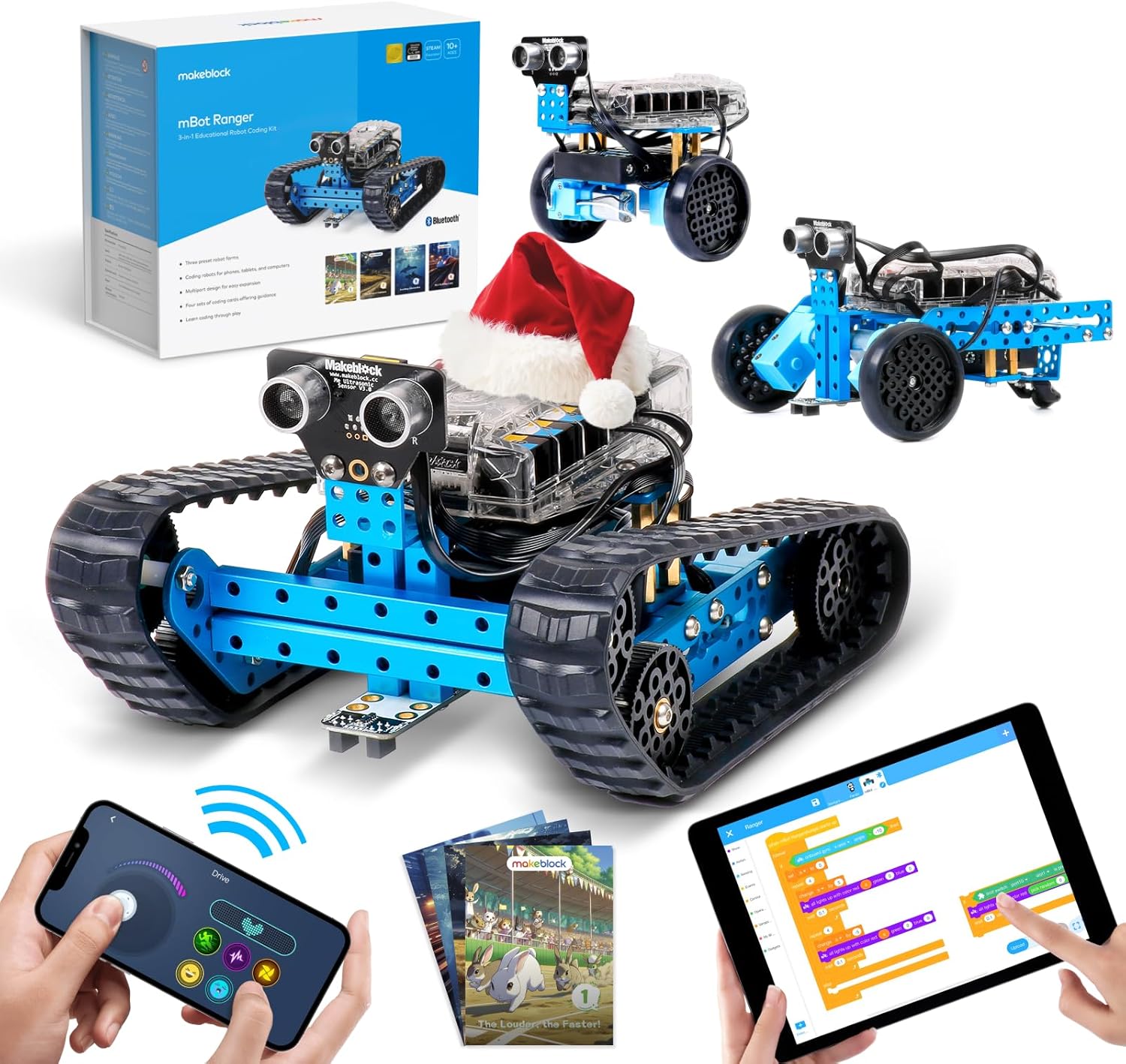
Verdict: the most capable kit here for a kid who has outgrown basic Scratch and wants three genuinely different robots to build and program.
Who it's for: kids 10 and up who've already used a basic coding robot and are ready for a bigger, more mechanically complex project with real Arduino programming underneath.
The Ranger reconfigures into three distinct robots (a tank-tread rover, a self-balancing two-wheeler, and a raft-style water vehicle), each requiring different code to control, which keeps the coding challenges varied instead of repetitive. It supports both Scratch and Arduino programming, so it doesn't get outgrown the way pure block-coding toys do. Its 4.3-star rating from 743 reviews is lower than the cheaper mBot, largely because the higher part count makes assembly genuinely time-consuming, which is worth setting expectations around before buying.
Pros:
- Three distinct build modes with different programming challenges each
- Supports both Scratch and full Arduino coding
- Highest build quality and most sensors of any kit here
Cons:
- Significantly more expensive than every other pick on this list
- Assembly time and part count can frustrate kids under 10
Who should skip it: if budget is the main concern, the standard Makeblock mBot above gives nearly the same coding education for less than half the price.
Apitor STEM Coding Robot Toy 6-in-1: Best Building Experience

Verdict: the pick for kids who love LEGO-style building as much as coding, with 480 blocks and six distinct robot builds from one box.
Who it's for: kids 7-12 who are drawn to physical construction toys first and coding second, and need the building itself to be as fun as the programming.
Apitor's 480-piece system uses a block-building format closer to construction toys than robotics kits, which lowers the barrier to the first build considerably, then layers app-based block coding and remote control on top once assembly is done. At 4.6 stars, it ties for the highest rating in this roundup, and while its 287-review count is smaller than the bigger names here, the consistency of that rating across builds is a reasonable signal of quality.
Pros:
- LEGO-style building system is approachable for construction-toy fans
- Six different robot builds from a single set
- Strong 4.6-star rating with consistent feedback
Cons:
- Smaller review base than the market-leading kits
- Fewer advanced sensors than the ELEGOO or Ranger kits
Who should skip it: kids who are more interested in coding depth than physical building should choose the ELEGOO UNO R3 instead, which puts more weight on the programming side.
Thames & Kosmos My Robotic Pet: Coding Chameleon: Best for Youngest Kids

Verdict: the only screen-free option here, teaching real coding logic through a mechanical dial system before kids are ready for an app or tablet.
Who it's for: kids ages 6-8 who are too young for app-based or Arduino coding but can still grasp sequencing and logic through hands-on play.
Instead of a companion app, this kit uses a mechanical coding wheel that kids physically program to sequence the chameleon's actions like color-sensing, tongue-flicking, and movement, teaching the core logic of programming (sequence, cause and effect, debugging by trial) without any screen time at all. It carries a 4.0-star rating from 324 reviews, the lowest numerically in this roundup, largely reflecting that some buyers expected app-based coding rather than the screen-free mechanical system it actually is; parents specifically wanting a no-screen introduction to logic have rated it well.
Pros:
- Completely screen-free, ideal for parents limiting tablet time
- Teaches real sequencing logic appropriate for ages 6-8
- Color-sensing chameleon behavior keeps engagement playful, not academic
Cons:
- No path to app-based or text coding once outgrown
- Lower rating reflects mismatched expectations about screen-free design, worth reading before buying
Who should skip it: kids 9 and up ready for real app or Arduino coding should start with the Sillbird or Makeblock mBot instead, both of which offer more coding depth.
Buying guide: what actually matters in a coding robot kit
Coding pathway matters more than the robot's looks. A kit that starts kids on drag-and-drop block coding (like Scratch) and later opens the door to text-based Arduino code will last years longer than a kit locked to one fixed skill level, since the child grows into more advanced programming without needing an entirely new toy.
Age ranges on the box are a starting point, not a guarantee. Build complexity and coding difficulty vary a lot within a stated age range; a "8-12" kit built for an 8-year-old is often frustratingly simple for a 12-year-old and vice versa, so match the kit to actual coding experience, not just age.
App support and update history matter as much as the hardware. A companion app that hasn't been updated in years can stop working after a phone OS update, effectively bricking the coding function while the robot itself still moves. Favor kits from manufacturers with an active app release history.
Battery and charging setup affects how much actual play happens. Kits running on AA batteries add ongoing cost and downtime waiting on replacements; rechargeable built-in batteries keep momentum going during a coding session.
Review volume is a better signal than star rating alone. A 4.6-star rating from 30 reviews carries far less weight than a 4.3-star rating from 700, since a larger sample smooths out both fake reviews and one-off manufacturing defects.
Final verdict
For most families, the ELEGOO UNO R3 Smart Robot Car Kit is the strongest overall pick: real Arduino hardware, multiple coding modes, and the largest proven review base of any kit here. For a true first-time coder starting from zero, the Makeblock mBot STEM Coding Robot is the better starting point, teaching Scratch first before opening the door to the same Arduino skills the UNO R3 uses.
Frequently asked questions
What age is right for a coding robot kit?
Most block-coding kits like the Makeblock mBot or Sillbird work well for ages 8-12, while Arduino-based kits like the ELEGOO UNO R3 suit kids 12 and up who already understand basic coding logic. For ages 6-8, a screen-free kit like the Coding Chameleon is a gentler starting point.
Do kids need coding experience before using these kits?
No. Every kit on this list is designed for first-time coders through a guided app or software, though beginners under 10 will generally do better starting with a block-coding kit like the Makeblock mBot rather than jumping straight into Arduino text code.
What is the difference between block coding and Arduino coding?
Block coding uses drag-and-drop visual commands, similar to Scratch, and is easier for beginners. Arduino coding uses real text-based C/C++ code, giving more control and transferring directly to other electronics projects, but it has a steeper learning curve.
Do these robot kits need a tablet or smartphone?
Most do, since the companion app is how kids write and upload code to the robot. The Thames & Kosmos Coding Chameleon is the exception, using a mechanical coding wheel instead, making it a good screen-free choice for younger kids.
How long does it take to build a coding robot kit?
Simpler app-based kits like the Sillbird or Apitor typically take 30 to 60 minutes to assemble. More advanced kits like the ELEGOO UNO R3 or Makeblock mBot Ranger, with more parts and sensors, can take a few hours spread across a couple of sessions.
Are these robot kits reusable after the first build?
Yes. Kits like the Sillbird and Apitor include multiple buildable models from one parts set, and Arduino-based kits like the ELEGOO UNO R3 support ongoing coding projects well beyond the included manual, so they don't stop being useful after the first build.